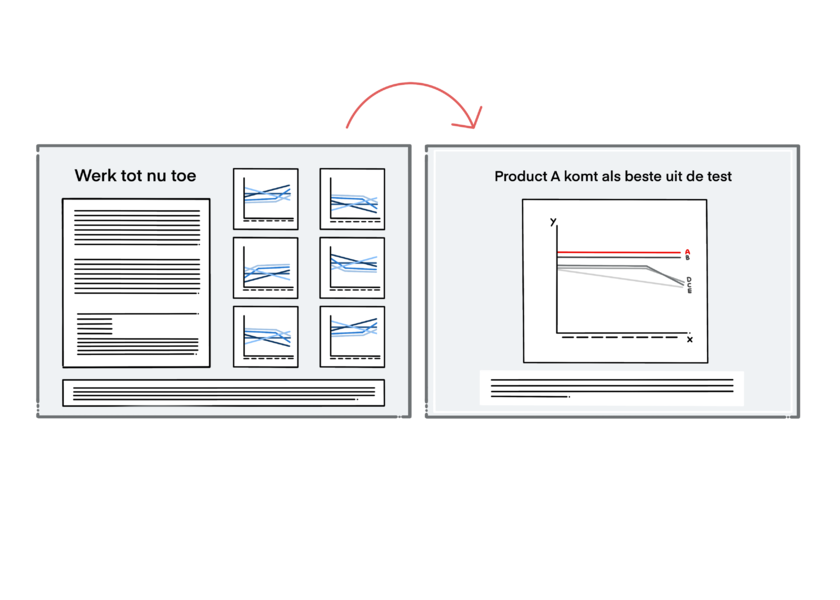
Recently, we conducted training at a client’s where terrible graphs seemed to be the norm: dizzying amounts of data visualized in a tangle of colored lines, bars, or combinations thereof, sometimes with as many as 6 on a single slide.
A slide looked like this:
The slide title was: “work so far”
On the left half of the slide, there were about ten bullet-pointed comments
The right half of the slide was filled with 6 line graphs.
After the participants eagerly set out to make their graphs understandable, the alternative slide looked like this:
First, the participants sharpened the message of the slide. They found that amidst the text clutter on the slide, there was one sentence that precisely summarized what the work so far had yielded: “Product X performs the best of all tested products.” That became the title of the slide.
Then it turned out that one of the graphs best visualized this message: a line graph showing that Product X consistently performed at the highest level (a horizontal line at the top of the graph), another product also performed consistently (a horizontal line slightly lower in the graph), while the performances of the other products declined (various downward sloping lines). The group decided to use a clear color for the best-performing product and a neutral, light gray color for the less performing products. This made the meaning of the graph even clearer.
So, here is the recipe for a clear graph:
- Sharpen the message by asking yourself: what conclusion do I draw from the available data?
- Use this conclusion as the title of your slide or graph.
- Choose the graph form that most simply supports this conclusion.
- Eliminate unnecessary information (known as ‘clutter’).
- Make the most relevant information stand out by using colors, contrasts, shapes, and clustering, meaning placing together what belongs together.